Author: alex

  • Mac Fat Trimmer

    See where your Mac’s disk space went. Visualize large files and find exact duplicates. Reveals and auto-selects files in Finder.
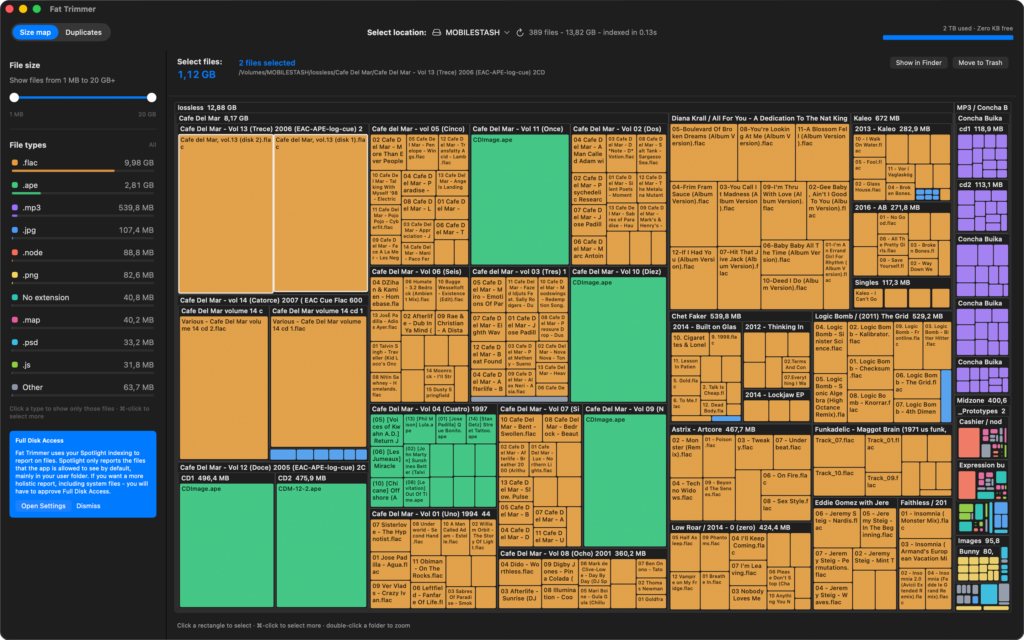
    Fat Trimmer size map of a Mac disk
    Size Map mode
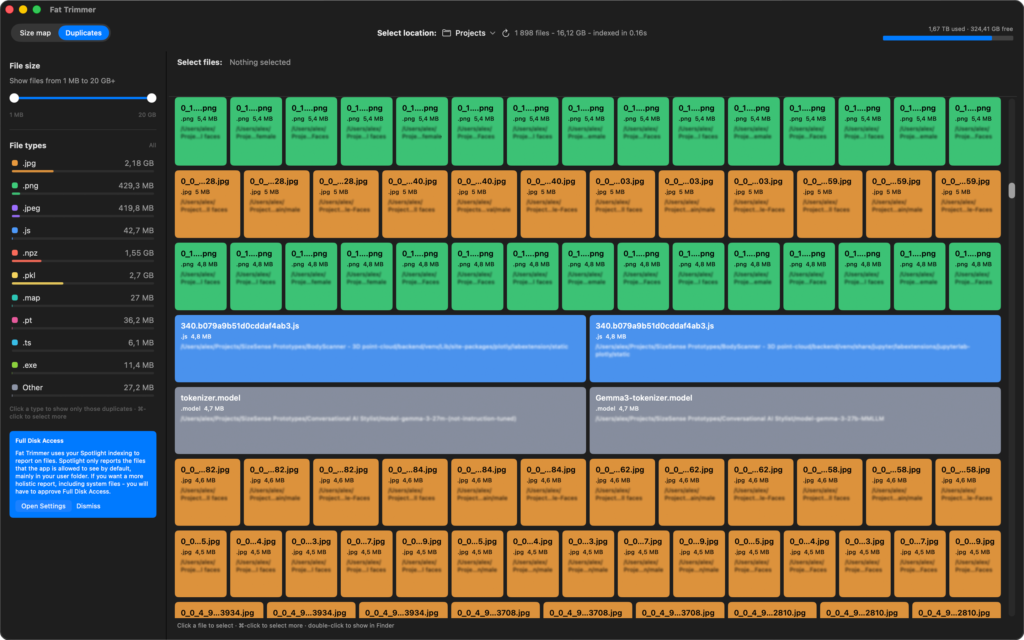
    Fat Trimmer duplicate file groups
    Exact Duplicates mode

    Fat Trimmer shows you where disk space actually went as a visual map. The app is lightning fast and intuitive to use.

    Open a drive or folder and you get a treemap of your largest files, colored by type. Bigger rectangle, bigger file. Click to select, zoom into folders, and jump straight to Finder or the Trash.

    When you are hunting copies, switch to the Duplicates mode. Fat Trimmer groups files that are byte-for-byte identical (same content, not just the same name), newest copy first, so you can keep one and discard the rest. Filter by size range and file type, so you are not staring at thousands of tiny files.

    Everything stays on your Mac. There is no account, no cloud, and nothing is uploaded. Move to Trash always asks before it removes anything. Full Disk Access is optional: without it you still see the files the system already lets the app read. But with full disk access the map can scan more of the volume, including system files.

    Fat Trimmer is a visualizer and a precise duplicate finder. It does not auto-clean caches, uninstall apps, or delete files behind your back.


    Data privacy

    Fat Trimmer does not collect, upload, or share your files or personal information.

    There is no account, no analytics, and no network service behind the app. Scans run on your Mac. To draw the map it reads file names, sizes, types, and dates. In Duplicates mode it also reads file bytes locally so it can tell identical copies apart. Nothing from that work leaves the computer.

    If you grant Full Disk Access, the app can see more of the disk (including areas Spotlight does not expose to sandboxed apps). That permission stays on the Mac and is optional. Revoke it any time in System Settings → Privacy & Security → Full Disk Access.

    Move to Trash uses Finder’s Trash. Fat Trimmer does not securely erase disks and does not send files anywhere else.


    How to use it

    Fat Trimmer starts from the files macOS already knows about, then fills in folders the index missed. You get a first map almost immediately. Larger system folders may appear a few seconds later as the scan continues.

    Choose a location

    Use Select location in the toolbar. Pick This Mac, a volume such as your boot disk, or Choose Folder… for a single directory. External volumes may ask you to grant access once. Fat Trimmer remembers that grant. The refresh icon button re-scans the current location.

    Size map

    The size map consists of rectangles, where each of them is a file or folder, and its area is proportional to size. Color follows file type, so videos, apps, photos, and “no extension” blobs are easy to tell apart. You can:

    1. Click a rectangle to select it. ⌘-click to add or remove items.
    2. Double-click a folder to zoom in. Show all returns to the top of the current location.
    3. The path under the selection name is clickable. If you are looking at the whole map, clicking a folder in the path selects it. If you have zoomed in, the path is a breadcrumb and takes you back to that folder.
    4. The copy icon after the path copies the full POSIX path.
    5. Show in Finder reveals and selects the current items. Move to Trash asks for confirmation on folders, large files, and multi-item selections. Files are moved to the trash, but not immediately deleted, in case you’ve done a mistake.

    Size slider filter

    The sidebar slider limits the map to a size range (from 1 MB upwards). The upper limit shows 20 GB but also includes everything above that as well. Use it to hide thousands of small files, or to hunt a band of large ones.

    File type filter

    Under File types, click a type to show only those files. You can select multiple file types by holding ⌘. Click on “All” to clear the filter.

    The filters are universally applied across both modes of operation.

    Duplicates

    Switch to the Duplicates finding mode from the toolbar. Fat Trimmer hashes files in the current size range and lists groups of exact copies, newest first. Click a file to select it, ⌘-click for more, double-click to show it in Finder.

    Duplicates are not guessed from names or dates. Fat Trimmer compares file content: same size, then a short hash, then a full hash if needed. Hard links to the same data count as one copy. Packages and unreadable files are skipped instead of aborting the scan.

    Full Disk Access

    Without Full Disk Access you still get a useful map of what the sandbox is allowed to read, which is mainly your user files and anything you explicitly opened. If you want a fuller picture of system folders, click on the button in the prompt, which will open the System Settings and allow you to give Fat Trimmer permission, then return to the app. The scan will pick up the extra files on its own.


    Support

    Fat Trimmer is free. It is provided as is, without warranties or dedicated support. There is no help desk and no guaranteed response time. If something is unclear, start with this page; Fat Trimmer → About Fat Trimmer in the app also has a User Guide link.

    You are welcome to write to support@recode.bg. We read mail when we can, but we cannot promise a reply.


    Donate

    If the app saved you a painful cleanup and you want to say thanks, a tip is welcome. It is optional – Fat Trimmer stays free either way.


    Leave a tip

  • Intelligent systems for optimal and adaptive control: Exercise Book

    Intelligent systems for optimal and adaptive control: Exercise Book

    This guide provides a solid introduction to the application of machine learning algorithms in various industrial and engineering contexts. It is designed to equip students with both the theoretical foundations and the practical skills required to implement control solutions, deploy forecasting techniques, perform clustering, classification, optimization, and decision-making.

    The book begins with an overview of the fundamental concepts of control theory and machine learning, and their role in industrial applications. It explores key topics such as open-loop and closed-loop control systems, data acquisition, and data preprocessing.

    It then continues with a curated set of exercises aimed at supporting students in applying machine learning techniques across different domains. The guide includes exercises on modeling various dynamic systems either from first principles or using historical data, as well as the application of algorithms for:

    Forecasting

    Techniques for building/training models for time series forecasting and interdependent variables, including:

    • Mean value
    • Weighted mean
    • Moving average
    • Single exponential smoothing
    • Double exponential smoothing (Holt’s method)
    • Triple exponential smoothing (Holt–Winters method)
    • Regression method (correlation analysis)
    • Recurrent Neural Networks (RNN / LSTM)

    Clustering

    Clustering techniques enable the identification of natural groupings and structures within datasets.

    • K-means

    Classification

    The book examines algorithms for classifying states and objects using artificial intelligence methods (through artificial neural networks), including:

    • Support Vector Machine (SVM)
    • Multilayer Perceptron (MLP)
    • Convolutional Neural Network (CNN)

    Optimisation

    The book also provides an example exercise for solving a linear optimization problem, including:

    • The Traveling Salesman Problem
    • The General Routing Problem

    Decision-Making

    An essential component of any intelligent control system is the decision-making module, especially when decisions must be made under uncertainty. The guide presents an example from the field of:

    • Fuzzy Logic

  • Интелигентни системи за оптимално и адаптивно управление: ръководство за упражнения

    Интелигентни системи за оптимално и адаптивно управление: ръководство за упражнения

    Това ръководство предоставя добро въведение в приложението на алгоритмите за машинно обучение в различни индустриални и инженерни контексти. То е предназначено да предостави на студентите както теоретичните основи, така и практическите умения, необходими за прилагане на решения за управление,
    внедряване на техники за прогнозиране, клъстериране, класификация, оптимизация и вземане на решения.

    Книгата започва с преглед на основните концепции на теорията на управлението и машинното обучение и тяхната роля в индустриалните приложения. Тя изследва ключови теми като системи за управление с отворен и затворен контур, събиране на данни и предварителна обработка на данни.

    След това продължава с набор от подбрани упражнения, които да улеснят студентите в различните приложения на машинното обучение. В ръководството могат да бъдат намерени упражнения по моделиране на различни динамични системи по първи принципи, или чрез исторически данни, както и приложение на алгоритми за:

    Прогнозиране

    Техники за създаване/обучение на модели за прогнозиране на времеви редове и взаимо-зависими променливи.

    • Средна стойност
    • Претеглена средна стойност
    • Пълзяща средна стойност
    • Единично експоненциално изглаждане
    • Двойно експоненциално изглаждане (Метод на Холт)
    • Тройно експоненциално изглаждане (Метод на Холт-Уинтърс)
    • Регресионен метод (корелационен анализ)
    • Рекурентни невронни мрежи (RNN / LSTM)

    Клъстериране (Клъстеризация)

    Техниките за клъстериране позволяват идентифицирането на естествени групирания и структури в наборите от данни.

    • К-среди

    Класификация

    Разглеждат се алгоритми за класификация на състояния и обекти чрез методи на т.н. изкуствен интелект (чрез изкуствени невронни мрежи).

    • Машина с опорни вектори (SVM)
    • Многослоен перцептрон (MLP)
    • Конволюционна невронна мрежа (CNN)

    Оптимизация

    Книгата предоставя и упражнение за примерно решение на задача за линейна оптимизация:

    • задача на пътуващия търговец
    • генерална задача на рутирането.

    Взимане на решения

    Важна част от всяка интелигентна система за управление е молуда за взимане на решения, особено когато това трябва да се извършва в състояние на несигурност. Ръководството разглежда пример от областта на:

    • Размита логика (Fuzzy logic)

  • Lego Пиксел Арт Генератор

    Lego Пиксел Арт Генератор

    Превърнете снимките си в LEGO шедьоври

    Случвало ли ви се е да погледнете някоя снимка и да си помислите,

    „Това би изглеждало невероятно като LEGO мозайка!“

    Или пък да сте виждали впечатляващи LEGO пиксел арт творби и да сте се чудили как авторите изчисляват точно кои елементи и цветове са им необходими?

    Този LEGO Pixel Art Generator е безплатен уеб инструмент, който прави създаването на персонализирани Лего мозайки и пиксел арт изключително лесно. Независимо дали сте Лего ентусиаст, артист или просто търсите оригинален начин да покажете любима снимка, този инструмент превръща всяко изображение в красив LEGO проект, като ви дава и ръководство за подреждане и пълен списък с нужните частици.

    Какво е LEGO Pixel Art Generator?

    LEGO пиксел-арт генераторът (известен още като LEGO мозайка-генератор, LEGO арт генератор или калкулатор за LEGO частици) е специализиран инструмент, който преобразува дигитални изображения в пикселизирани версии, използвайки цветовете на LEGO елементите. Той анализира изображението, намира най-близките съвпадащи LEGO цветове и създава план, показващ точно къде трябва да се постави всяко парче, за да се получи изображението.

    Това приложение издига тази идея на следващо ниво, като предлага цялостно решение, което работи изцяло в браузъра и напълно офлайн след първоначалното зареждане. Това означава, че изображенията ви никога не напускат компютъра ви, гарантирайки пълна поверителност.

    Основни характеристики на LEGO арт генератора

    1. Изцяло браузърно решение

    За разлика от други LEGO генератори, които изискват качване на файлове на сървър, това приложение работи изцяло локално чрез JavaScript във вашия браузър. Това осигурява:

    • Пълна поверителност: снимките ви не напускат устройството ви, не се качват на сървър и никой друг няма достъп до тях.
    • Без регистрация: Може да започнете да творите веднага.
    • Работи изцяло офлайн: Веднъж заредена страницата, няма нужда от допълнително интернет връзка.
    • Без ограничение в размера на изображението: Може да обработите колкото голямо изображение искате (до колкото вашия хардуер го позволява).

    2. Прецизно съпоставяне на цветовете

    Генераторът използва усъвършенствани алгоритми с евклидово разстояние в RGB цветово пространство, за да намери най-близкия LEGO цвят за всеки пиксел. Това гарантира:

    • Точно цветово възпроизвеждане с официални LEGO цветове
    • Автоматично изключване на прозрачни и недостъпни цветове
    • Поддръжка на всички плътни LEGO цветове от официалната палитра

    3. Персонализирано изчисление на размера

    Въведете желания размер на таблото в метрични (милиметри) или имперски (инчове) единици. Генераторът автоматично изчислява:

    • Точните размери на матрицата от LEGO 1×1 елементи (7,8 мм × 7,8 мм за елемент)
    • Общия брой необходими елементи
    • Крайните размери с прецизно отчитане на мащаба

    4. Интерактивно превю

    Преди да поръчате частиците виждате точно как ще изглежда резултатът:

    • Сравнение едно до друго между оригиналното изображение и Лего версията
    • Превю в реално време с показани точните идентификационни номера на Лего частиците
    • Матричен изглед показващ точното разположение на всеки елемент и неговия цвят

    5. Пълен списък за поръчка на елементи

    Без значение от къде решите да си доставите Лего компонентите, апа ще ви даде точна информация: , от който трябва да поръчате.Never wonder what to order again! The generator provides:

    • Списък с конкретните количества за всеки цвят
    • Идентификационните номера за всеки Lego цвят
    • Специфичните Lego имена на необходимите цветове
    • Брой елементи, подредени по необходимото им количество

    6. PDF ръководство за подреждане

    Изтеглете професионално PDF ръководство, което включва:

    • Цветно кодирана карта за подредба с ID на всеки елемент
    • Пълен списък с елементи и количества
    • Идеално за разпечатване и използване по време на сглобяването.

    7. Директна връзка към LEGO Store

    С едно кликване получавате достъп до услугата Pick a Brick на LEGO, за да поръчате точно необходимите 1×1 елементи.

    Как да използвате LEGO Pixel Art Generator

    Работата с инструмента е изключително лесна:

    1. Качете изображение: Провлачете файла до зоната за качване, или кликнете за да се отвори файловия браузър. Изберете снимка в някой от тези формати (JPG, PNG, GIF, WebP, etc.)
    2. Задайте размер: въведете желания размер на проекта
    3. Изберете мерни единици: Може да сменяте между метрични (mm) и имперски (inches)единици, като автоматично конвертирате между тях
    4. Прегледайте резултата: вижте пикселизираното изображение и цветовете
    5. Изтеглете ръководството: Изтеглете PDF с инструкции и списък за поръчка
    6. Поръчайте елементите: Използвайте линка към официалния Лего магазин за да поръчате необходимите частици

    Подходящо за…

    LEGO ентусиасти

    Създавайте уникални LEGO произведения за дома, офиса или колекцията си – семейни снимки, портрети на домашни любимци и любими изображения.

    Подарък за любим човек

    Проектирайте персонализирани LEGO подаръци за рождени дни, годишнини и специални поводи.

    Артисти и дизайнери

    Планирайте мащабни LEGO мозайки и изчислявайте материалите предварително.

    Учители

    Обучавайте учениците си в теория на цветовете, пиксел арт и математически концепции като пиксел матрици, пропорции и мащаб.

    Организатори на събития

    Създавайте персонализиран LEGO арт за събития, благотворителни инициативи и обществени проекти.

  • Lego Pixel Art Generator

    Lego Pixel Art Generator

    Transform Your Photos into Lego Masterpieces

    Have you ever looked at a photograph and thought,

    “This would look amazing as a Lego mosaic!”

    Or perhaps you’ve seen stunning Lego pixel art displays and wondered how creators figure out exactly which bricks and colors they need?

    This Lego Pixel Art Generator is a free web-based tool that makes creating custom Lego mosaics and pixel art incredibly simple. Whether you’re a Lego enthusiast, an artist, or someone looking for a unique way to display your favorite photo, this simple tool transforms any image into a beautiful Lego project, together with a building guide and a complete bricks shopping list.

    What is a Lego Pixel Art Generator?

    A Lego pixel art generator (or a Lego mosaic maker, Lego art generator, or Lego brick calculator) is a specialized tool that converts digital images into pixelated versions using Lego brick colors. These tools analyze your image, determine the closest matching Lego colors, and create a grid-based blueprint showing exactly where each brick goes.

    Our app takes this concept to the next level by providing a comprehensive, browser-based solution that works entirely offline after the initial load – meaning your images never leave your computer, ensuring complete privacy.

    Key Features of the Lego Brick Art Generator

    1. Entirely a Browser-Based Solution

    Unlike other Lego mosaic generators that require server uploads, our app runs entirely in your browser using JavaScript. Your images are processed locally, providing:

    • Complete Privacy: Your photos never leave your device
    • No Account Required: Start creating immediately
    • Works Offline: Once loaded, the app functions without internet connection
    • No File Size Limits: Process images of any size without server restrictions

    2. Precise Color Matching

    The generator uses advanced Euclidean distance algorithms in RGB color space to find the closest available Lego brick color for each pixel. This ensures:

    • Accurate color representation using official Lego colors
    • Automatic exclusion of transparent and unavailable colors
    • Support for all solid Lego colors from the official palette

    3. Custom Size Calculation

    Input your desired board size in either metric (millimeters) or imperial (inches) units. The generator automatically calculates:

    • Exact grid dimensions in Lego 1×1 bricks (7.8mm × 7.8mm per brick)
    • Total number of bricks needed
    • Precise final dimensions accounting for brick sizing

    4. Interactive Preview

    Before committing to a build, see exactly how your image will look:

    • Side-by-side comparison of original and pixelated versions
    • Real-time preview with Lego color IDs displayed
    • Grid visualization showing the exact brick layout

    5. Comprehensive Shopping List

    Never wonder what to order again! The generator provides:

    • Complete breakdown of required bricks by color
    • Lego color IDs for easy ordering
    • Color names and visual previews
    • Quantities sorted by usage (most to least)

    6. Printable PDF Building Guide

    Download a professional PDF guide featuring:

    • Color-coded building map with brick IDs on each square
    • High-resolution grid showing exact brick placement
    • Complete shopping list with quantities
    • Perfect for printing and referencing during construction

    7. Direct Lego Store Integration

    One-click access to Lego’s Pick a Brick service to order the exact 1×1 plates you need, making the ordering process seamless.

    How to Use the Lego Pixel Art Generator

    Using our tool is incredibly straightforward:

    1. Upload Your Image: Drag and drop or select any image file (JPG, PNG, GIF, WebP, etc.)
    2. Set Your Size: Enter your desired board size – the tool automatically calculates the optimal grid dimensions
    3. Choose Your Units: Toggle between metric (mm) and imperial (inches) units with automatic conversion
    4. Preview the Result: Review the pixelated version and see the color mapping
    5. Download Your Guide: Get the PDF building guide and shopping list
    6. Order Your Bricks: Use the integrated link to purchase bricks directly from Lego

    Perfect For…

    Lego Enthusiasts

    Create custom Lego art pieces to display in your home, office, or collection. Transform family photos, pet portraits, or favorite artwork into stunning Lego mosaics.

    Gift Creators

    Design personalized Lego art gifts for birthdays, anniversaries, or special occasions. The PDF guide makes it easy for anyone to build, even without extensive Lego experience.

    Artists and Designers

    Use as a planning tool for large-scale Lego mosaic projects. Preview color schemes and calculate material needs before purchasing bricks.

    Educators

    Teach students about color theory, pixel art, and mathematical concepts like grids, ratios, and scale. Great for STEAM education projects.

    Event Organizers

    Create custom Lego pixel art for events, fundraisers, or community projects. The shopping list feature helps with budget planning.